Brand Colors
Introduction to Brand Colors
The concept of the brand colors is that all the users can use and include the common brand colors to all the videos so that they follow the brand guidelines of your organization.
Brand colors can be seen at the "Brand color" tab on the top left corner of the Icareus Studio Editor tool:

Notice: Brand Colors can only be deleted by the administrator users
Adding New Brand Colors to Icareus Studio
The new brand colors can be added by clicking on the "Add color" button:
It will open a pop-up:
You can enter the color as a hex code in the text field, or click the "Select" button to open the color picker:
Here, you can select the color manually, or enter it in either as a 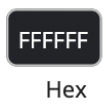 hex code or
 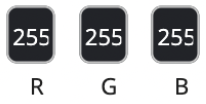 RGB values. Click the "Select" button when you're done to select the color. This will return you to the "Add Brand Color" pop-up, and the color you've selected will appear in the text field as a hex code. Click "Add" to enter the color to you brand colors.
The color will appear on the brand color menu:
Use of Brand Colors
If there are colors on the Brand Colors list, those are the color options shown when selecting colors for elements such as text or shapes:
If there are no colors on the Brand Color list, instead of the drop-down list there will be a text field and color picker.
Related Articles
Brand Fonts
Introduction to Brand Fonts The concept of the brand fonts is that all the users can use and include the common brand fonts to all their videos so that they follow the brand guidelines of your organization. Brand fonts can be seen under the "Brand ...Brand Media
Introduction to Brand Media The concept of brand media is that all users can insert brand media files to their videos so that they follow the brand guidelines of your organization. This can include, for example, graphics following the visual ...Brand Elements
Introduction to Brand Elements The concept of the brand elements is that all the users can use and include the common brand elements to all the videos so that they follow the brand guidelines of your organization. These brand elements can be e.g.: ...Event & Webinar Player
Themes for an event or webinar page are defined under Events -> Event themes. Themes provide a versatile and easy way to customise the look and feel of your event. Options for customizing an event There are four options: Event and webinar player as a ...Event & Webinar Player
Introduction The theme of the event or webinar page is configured under Players. Webinar players provide versatile, easy way to customize the look & feel of the video event. Options to use Custom Event & Webinar UX There are four options: Event & ...