Managing OTA SSU transport stream
Introduction
Icareus Playout OTA SSU Server is a playout system for delivery of OTA SSU transport streams and related tables (e.g. PMT, UNT related etc) over DVB services.
When a transport stream file is uploaded to new OTA SSU TS instance, it is parsed and all input PIDs from it are displayed to choose from.
Parser informs if the file is not valid OTA SSU transport stream file.
SSU Transport Streams Tree
SSU TS -tree lists all available OTA SSU transport streams on Icareus Playout server. It is a repository and user may add any of the OTA SSU TS to any DVB Service.
Streaming OTA SSU TS
OTA SSU Streams once attached to a Service, can be streamed , either manually or using timers.
Streams are transport stream sources (DSM-CC carousels, OTA SSU carousels etc.) that have been attached to a DVB service. A stream is required in order to start a source and to add it to Playout server's internal transport stream multiplexer.Please refer to Managing Services -chapter for details how to assing Applications to services.
Adding OTA SSU transport streams
OTA SSU TS instances are added with "Upload TS File" -button.
Which opens a modal that is used to upload OTA SSU ts file.
 If uploaded OTA SSU TS file is not valid, this alert is displayed:
When a valid file is uploaded, the modal looks like this:
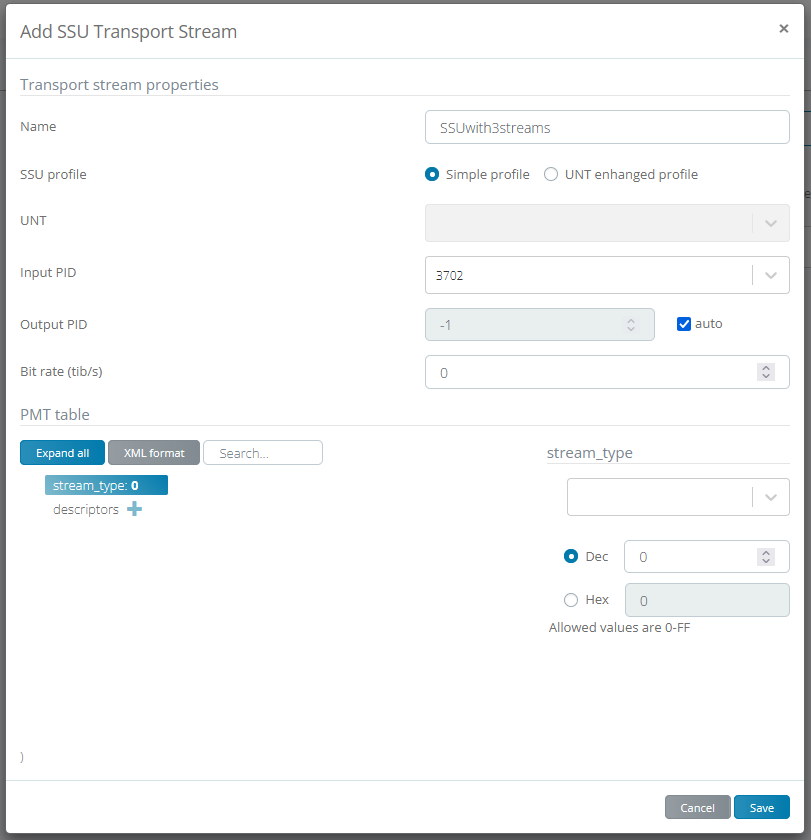
When OK button is pressed this modal will be displayed:
.
OTA SSU TS Settings
Properties
NAME: Name of the OTA SSU TS instance SSU profile: Selected SSU profile (simple or UNT enhanged) UNT: Selected UNT (if UNT enhanced profile is used) Input PID: Seletced input PID from uploaded file Output PID: Selected output PID for OTA SSU TS Bit rate (bit/s): Output bitrate of this OTA SSU TS Size: Size of uploaded file User: User that is used when creating OTA SSU TS instance |
PMT Descriptors
This tab provides an editor for the PMT table.
Compatibility, UNT Target and UNT Operational Descriptors
These tabs provides an editor for the OTA SSU TS object specific descriptors. The can configured the same way as PMT descriptors.
TS files
It is possible to change a different OTA SSU TS file for the instance. When tool icon is pressed, this popup will be displayed:
When OK button is pressed, a button with text "Save file changes" is displayed. After that is pressed, a new OTA SSU TS file is saved to the Playout server.
Note that if OTA SSU TS object is already attached to some service, and stream has been started, it should be stopped and started again.
Note also, that if OTA SSU TS file is large, it is good to wait about 10 seconds before saving changes to server.
Note also, that if new OTA SSU TS file doesn't contain the input PID that has been configured for used OTA SSU TS instance, the stream starting fails.
Related Articles
Managing SSU
UNT UPDATE NOTIFICATION TABLE SSU server can generate multiple UNT sub tables that each have a unique OUI (i.e. two sub tables can't use the same OUI value). Currently all UNT sub tables are sent on a single PID. To edit UNT PID, select UNT from ...Managing PSI-SI Generation
INTRODUCTION Icareus Playout server’s PSI/SI generation generates all related tables: Program Association Table (PAT) Program Map Table (PMT) Bouquet Association Table (BAT) Event Information Table (EIT) IP/MAC Notification Table (INT) Network ...Managing Subscribers
Introduction Subscribers are the end users of Icareus Suite service. With OPTIONAL Subscriber module you can restrict and deepen to relationship with your video service viewers, required especially if: You want to charge the viewers for the content ...Managing Stream Events
1. INTRODUCTION Stream events are used to synchronise an application with an MPEG stream. There are two types of stream events, Do it now events and NPT events. NPT events require an NPT stream that is used for synchronising an application with NPT ...Managing Networks
INTRODUCTION Networks are a key feature of Icareus Playout platform. Each Network contains one or several Actual subnetworks and those in the system represents a individual transport stream with DVB Services, data services, configurations, tables, ...