ASI Input
Introduction
It is possible to fetch EIT events directly from a transport stream sent sent to the Dektec ASI card. A Dektec card with a ASI input port is required for that: e.g. DTA-2144B.
Supported Input Cards
The following Dektec Models are supported:
- DTA-2145
- DTA-2144B
- DTA-105 (Legacy)
Settings
To define general settings for the ASI Input Data source select menu "Server -> Settings -> EIT -> ASI":
To define settings separately for each service right click on the service and select "Edit Service -> EIT source -> ASI input Data Source":
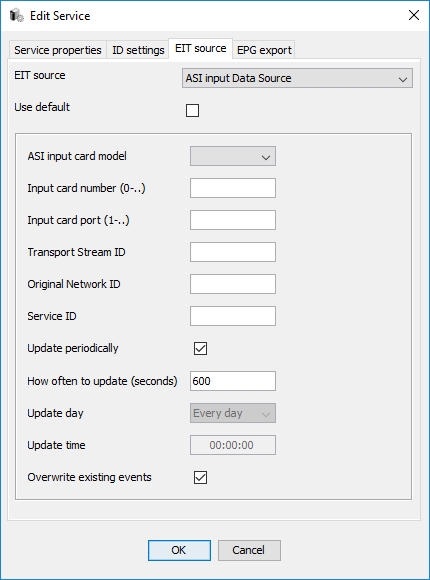
The parameters are:
- ASI input card model - a Dektec card that supports ASI-input feature
- Input card number (0-..) - if there are several similar cards installed, it is possible to define which exactly card to use
- Input card port (1-..) - if there are several ports on the card, it is possible to define which port to use
- Transport Stream ID - The ID of the transport stream that should be used
- Original Network ID - The ID of the original network that should be used
- Service ID - The ID of the service from the transport stream to use
- Port (1-..) - The port number used for transport stream transmission
- Update periodically - this flag defines if events should be fetched periodically
- How often to update (seconds) - the period of the update measured in seconds
- Update day - the day of a week to fetch events
- Updae time - the time of a day to fetch events
- Overwrite existing events - this flag defines if received events should overwrite existing events