Sharing Video Assets Between Accounts

Sharing Video Assets Between Accounts

Introduction

For customers that have several accounts it is possible to share Assets between the Accounts. The sharing can be done from the parent account to its sub-accounts. Use cases could be e.g. to have company's corporate videos on the parent account and each division can have in-addition their own videos. Another example is when a sports club chain wants to share training videos between teams and teams want to have their own videos as well.

Allocating assets via packages
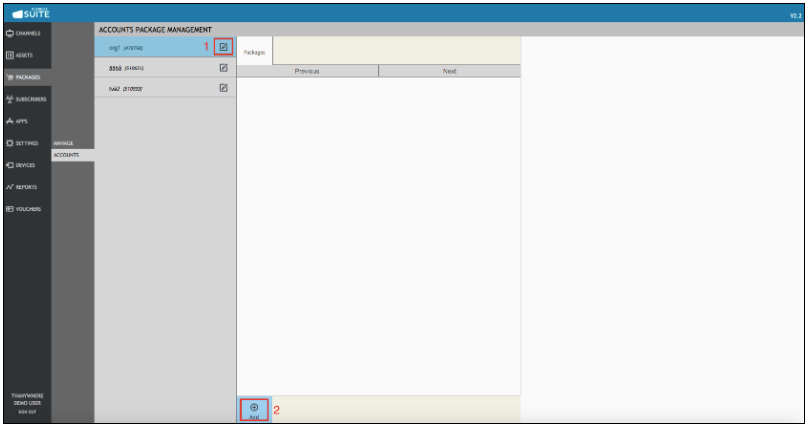
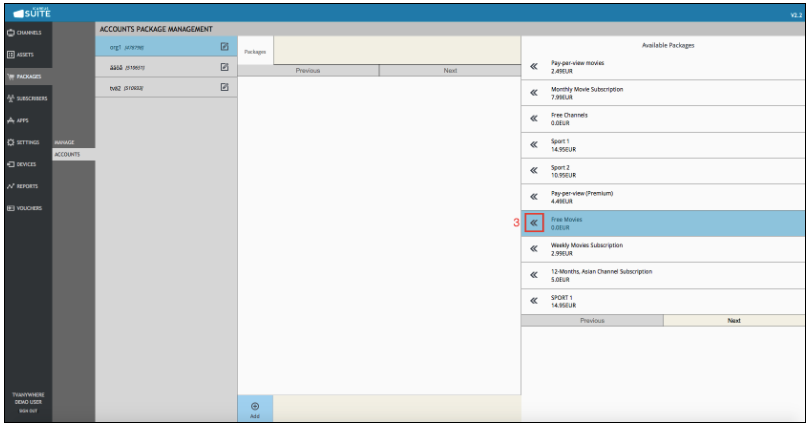
Assets can be allocated to sub-accounts easily using Icareus Suite. This can be done under "Packages" > "Accounts". Here admin can select the account to allocate content to, and then assign a content package to that account. This is illustrated below:


    • Related Articles

    • Managing Premium Services and Content Packages

      Introduction Icareus Suite provides multiple options to monetize all content: channels, videos and events. Content can be monetized by placing it under various types of purchasable packages with different models that Icareus Suite provides. The ...
    • Managing Accounts

      MANAGING ACCOUNTS ACCOUNTS INTRODUCTION AND FEATURES 1. INTRODUCTION Icareus Suite's Accounts Management is a specific tool for Icareus Suite partners, customers and users that are using Icareus Suite to manage multiple services or having other ...
    • Youtube - Uploading on-demand videos to YouTube account

      Introduction YouTube is the world's 2nd most used social media service, with 1.9 billion monthly users. YouTube's content volumes are just as staggering. Based on the statistics (2019) every minute YouTube users upload 500 hours of new content to the ...
    • Managing Videos

      Introduction VIdeos are the core of Icareus Suite. The management of videos is described in this chapter. Managing Video Assets Add New Videos to Cloud Icareus offers four (4) ways to add content on the platform: Manually via Icareus Suite web user ...
    • Clipping a video

      Introduction You can clip a video directly in the cloud environment. Clipping means cutting footage from the video into separate video assets. Clipping To open the clipping tool, click the "Clip video" icon next to the video preview on the video ...